

SPEED
Fast, efficient scanning without accuracy loss.
WHAT IS CALIBRIO INSPECT
Make 3D Scanning simple
Enhance precision, accuracy, and reliability in your manufacturing processes with Calibrio Inspector, a cutting-edge 3D Quality Assurance (QA) software. Seamlessly integrating with CAD and 3D scanning technologies, it helps manufacturers improve quality control and optimize inspection workflows for greater efficiency.
SPEED
Fast, efficient scanning without accuracy loss.
ACCURACY
Precision measurements for superior quality and consistency.
SPEED
Fast, efficient scanning without accuracy loss.
RELIABILITY
Consistent, repeatable results with advanced metrology.
SPEED
Fast, efficient scanning without accuracy loss.
SPEED
Fast, efficient scanning without accuracy loss.
SPEED
Fast, efficient scanning without accuracy loss.
EASE OF USE
Intuitive, non-contact scanning for seamless operation.
SPEED
Fast, efficient scanning without accuracy loss.
ABOUT 3D SCANNING SOFTWARE
What makes 3D scanning inspection software so important?
SPEED
Fast, efficient scanning without accuracy loss.
Unparalleled Accuracy
3D scanning inspection software delivers precise, high-resolution data for accurately measuring complex geometries, surpassing traditional tools like cal. It improves reliability and reduces errors and rework.
SPEED
Fast, efficient scanning without accuracy loss.
Time Efficiency
Manual inspections are inconsistent. 3D scanning rapidly digitizes and analyzes components, cutting inspection time while ensuring high quality, essential for fast-paced production.
SPEED
Fast, efficient scanning without accuracy loss.
Versatility in Applications
3D scanning inspection software is versatile, aiding in reverse engineering, quality control, dimensional analysis, and defect detection in industries like aerospace, automotive, medical devices, and consumer electronics.
SPEED
Fast, efficient scanning without accuracy loss.
Non-Destructive Testing (NDT)
3D scanning uses non-contact metrology, allowing for the inspection of fragile parts without physical contact or risk of damage, thus preserving their integrity.
SPEED
Fast, efficient scanning without accuracy loss.
Streamlined Quality Control
Integrating 3D scanning software into quality control improves consistency by comparing scanned models to CAD designs or standards, quickly identifying discrepancies to ensure compliance with specifications.
SPEED
Fast, efficient scanning without accuracy loss.
Data Visualization & Analysis
3D scanning inspection software offers visualizations like heatmaps and color-coded deviation charts, enabling engineers quality control teams to swiftly identify issues and enhance processes.
SPEED
Fast, efficient scanning without accuracy loss.
Cost-Effectiveness
While the upfront of 3D scanning inspection software is considerable, its long-term savings are clear. It lowers manual labor, reduces material waste, and prevents expensive production errors, quickly justifying the investment.
SPEED
Fast, efficient scanning without accuracy loss.
Enhanced Innovation
3D scanning inspection software speeds up innovation by enabling manufacturers to quickly prototype refine designs, offering insights into component performance and quality for better manufactability.
SPEED
Fast, efficient scanning without accuracy loss.
FEATURE HIGHLIGHT
Key Features Overview
SPEED
Fast, efficient scanning without accuracy loss.
Support Various of CAD Data Formats
It offers comprehensive format support, including import interfaces for major CAD software like CATIA, SolidWorks, Creo (Pro/E),
Siemens NX, SolidEdge, and more.
SPEED
Fast, efficient scanning without accuracy loss.

Importing Product and Manufacturing Information (PMl)
Certain CAD systems support embedding geometric dimensioning and tolerancing (GD&T) data directly into the model. Depending on the file format, this allows the import process to recognize and extract features along with their associated control frames for accurate GD&T integration.
SPEED
Fast, efficient scanning without accuracy loss.
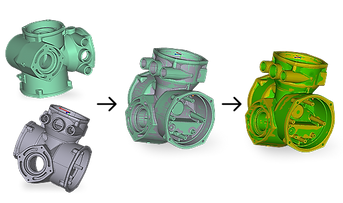
Ultra-Precision Automatic Alignment
It offers a wide range of alignment methods, including automatic alignment, optimal alignment, benchmark alignment, RPS alignment, 3-2-1 alignment, and transformation alignment, fully catering to diverse application needs.

Comprehensive GD&T Inspection Solution
Experience powerful GD&T (Geometric Dimensioning and Tolerancing) capabilities with precise tolerance evaluation based on ASME Y14.5 standards. Automatically calculate geometric deviations, accurately analyze inspection results, and ensure high-precision quality control across various application scenarios.
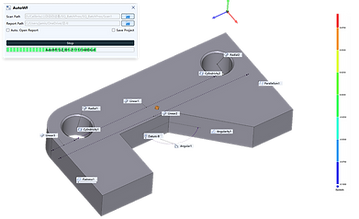
Online Real-Time Inspection
Effortlessly achieve real-time automated inspection with Calibrio Inspector.
Simply set the folder path, and as scanned data is saved, the system automatically detects, imports, and inspects the data - delivering accurate inspection results and comprehensive reports without manual intervention.

Batch Inspection
Scanned files from the specified path are retrieved and imported in batches, with all inspection items automatically recalculated based on the latest
inspection criteria, ensuring updated results and enabling high-efficiency large-scale automated inspection.
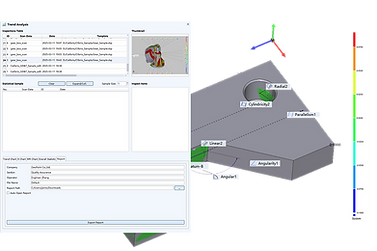
Trend Analysis
Unlock powerful insights with our Trend Analysis feature, designed for precise dimensional control. Analyze statistical data and trend charts with ease, using a variety of interactive tools to filter the samples that matter most. Customize parameter settings to update and refine
trend charts, offering a clearer and more intuitive view of your quality cycle management.

3D Contourline Analysis
The software seamlessly computes 3D height data and visually presents it through vibrant color cloud maps and detailed contour lines. It extracts precise 2D section profiles from the 3D topography, assesses deviations, and accurately measures the scope of defects. Moreover, it automatically generates comprehensive reports and captures 3D graphics along with in-depth analysis results.

Automatic Output Reports
Effortlessly generate inspection reports with our automatic reporting feature.
Based on predefined templates, reports are quickly created, including analysis images and calculation results. Easily export your reports in PDF, Word, or PPT formats for seamless documentation and sharing.